Autumn Bumper Harvest from Gearbest

Showing posts with label firmware. Show all posts

Sunday, October 30, 2016

HIFIXPLAY Q Smart TV Box Amlogic S912 Octa-core Processor only 65,34 $ FOR LIMITED TIME

HIFIXPLAY Q Smart TV Box Amlogic S912 Octa-core Processor  -  EU PLUG  BLACK 197825103
Android 6.0 OS 2.4GHz + 5.8GHz Dual Band WiFi H.265 VP9 Decoding

To order it visit the Official Gearbest Product Page 

Monday, October 3, 2016

How to Update your MXiii 4k Android TV Box

This guide will show you how to update the firmware of your MXiii. It is originally written for the Tronsmart Vega S89 but it should work for all Amlogic TV Boxes


Sunday, September 21, 2014

Download The Stock Firmware For The MXiii 4k Android TV Box

You can download the latest MXiii 4k Android TV Box Stock Firmware from the links below

For the 1 GB RAM and 8 GB ROM version click HERE

For the 2 GB RAM and 8 GB ROM version click HERE

Translate it using Google Chrome because it' s in Chinese


Wednesday, May 21, 2014

New firmware for Mele A1000G and M9 TV Boxes V.3.1.4

Unlike some rumours that Mele had abandoned their Quad Core A1000G and M9 TV Boxes sporting the Quad Core Allwinner A31, i am very glad to witness a new firmware update. This update is v3.1.4


How to manually update your Mele A1000G android TV Box

This is a guide on how to manually update your Mele A1000G Quad Core TV Box withe latest OFFICIAL Update

For Allwinner A31 models there is a new tool called PhoenixCard that replaces the old LiveSuit used for  the previous A10 platform.

There is no need to root your device as it comes prerooted

1. Update method by SD Card (RECOMMENDED)
2. Update method by USB Stick

Thursday, May 8, 2014

3D graphics support for Rockchip RK3188 devices on Linux

Developers have been porting Ubuntu and other operating systems to run on tablets and TV boxes with Rockchip RK3188 quad-core chips since mid-2013. The RK3188 chip is one of the fastest ARM Cortex-A9 processors around, and Ubuntu is surprisingly snappy on devices with the processor… but up until now there’s been no Linux support for hardware-accelerate graphics.
That means that while web browsers, office apps, and other basic software run well on a device like the MK802 IV LE, up until now it’s been tough to play 3D games or run some other apps using Linux on this type of device.

Now a group of developers have added initial support for hardware-accelerated graphics.


Monday, April 28, 2014

Firmware Upgrade Tutorial for TV Boxes with Amlogic S802

This is a short guide to upgrade your Amlogic S802 TV-Box. There are two methods to update it. If there is only one file use method 1 and if there are multiple files use Method 2.

1 - From a PC with .img file
  1. Download and install the tool on your PC from HERE the appropriate drivers will be installed too.
  2. Restart your PC 
  3. Run the USB_Burning_Tool that you installed on your PC and from the File / Import image img tab select the file you downloaded to install the firmware.. 
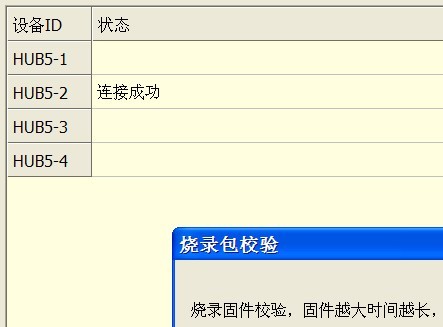
  4. Now turn your TV-Box off and connect it to your PC by the USB-OTG port with the MicroUSB cable. Now press the recovery button that is located beside the A/V connector and simultaneously turn the TV-Box on. If all went according to plan the flash tool will recognize your TV-Box as pictured.

Official Firmware for Beelink S802 Quadcore TV Round Box (24/04/2014)

A new firmware for the Beelink round TV Box powered by the Amlogic S802 is available for download, this device is sold by various stores and brands. It also has two variants with different WIFI chip and internal storage.